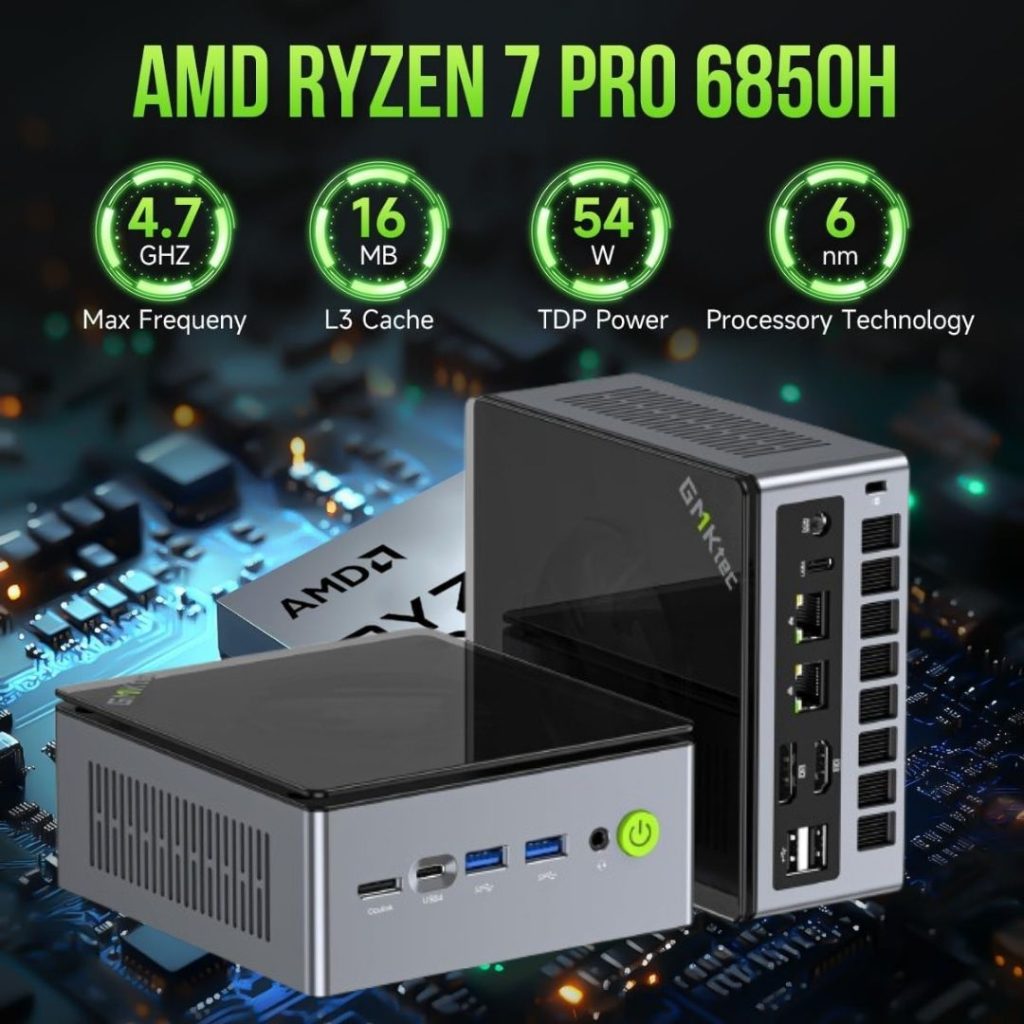
GMKtec Gaming Mini PC (Ryzen 7 PRO 6850H) (sometimes listed as the NucBox M7 or similar) — including its strengths, potential drawbacks, and how it stacks up for use in a gaming / compact-desktop setup.
✅ Key Specifications & Highlights
-
Processor: AMD Ryzen 7 PRO 6850H (8 cores / 16 threads, up to ~4.70 GHz) — a strong mobile/workstation-class chip in a mini-PC form factor.
-
Memory & Storage (in the configuration you mentioned): 32 GB DDR5 + 1 TB PCIe SSD — this gives plenty of headroom for gaming, productivity and multitasking.
-
Connectivity & I/O:
-
Dual 2.5 Gbit LAN (dual NIC) — great for networking, streaming, home-server/hub tasks. Amazon+1
-
Dual USB4 ports + USB-C, HDMI 2.1 output — very good modern ports for displays, high bandwidth devices.
-
“OCuLink” port (according to the product page) for external GPU/expansion support.
-
-
Form factor: Compact mini-PC design — the advantage of taking much less desk space yet retaining strong performance.
-
Good reviews for features: According to a Reddit thread, one user said:
“The features are phenomenal … OCuLink offers great eGPU connectivity, multiple USB4 ports, dual lan, lots of usb ports.”
🎮 Why It’s a Good Choice for Gaming / Compact Setup
-
With the Ryzen 7 PRO 6850H, you’re getting a chip that delivers strong multi-threaded performance (useful for streaming, recording, modern games with background tasks) while still being efficient in a small chassis.
-
The HDMI 2.1 output makes it suitable for high refresh monitors and potentially 4K60 or 1440p120 setups depending on the GPU side.
-
Dual LAN + modern I/O makes it future proof: If you’re using it as more than just a one-purpose gaming box (e.g., for media server, network tasks, compact workstation) this covers a lot of bases.
-
The compact size means it fits well in living-room setups, smaller desks, or minimalist builds without sacrificing too much performance.
⚠️ Things to Consider / Potential Drawbacks
-
Integrated graphics: While the CPU is very capable, if you’re expecting to run ultra-high end gaming (e.g., 1440p ultra with newest AAA titles) the performance may still depend heavily on what GPU or external GPU you pair (if you use the OCuLink for eGPU). The mini PC likely uses integrated graphics or a modest iGPU, so performance will depend on your expectations.
-
Cooling & thermals: Mini PCs tend to have tighter thermal envelopes than full-sized desktops. Especially under sustained loads (gaming + streaming) the fan noise, thermal throttling or sustained performance might be lesser than a full tower. Some user threads mention “active cooling on both sides of the mini pc” as a plus.
-
Upgradeability: While many mini PCs allow upgrades (SSD, RAM, maybe external GPU), there may still be limitations compared to a full desktop (e.g., fewer PCIe slots, less space for large GPUs, fewer cooling options).
-
Price / value: Given its strong specs, make sure you’re comparing vs alternatives in your region (UAE / UAE import costs) to see if you’re getting good value.
-
Port configuration: Ensure the specific unit you buy matches the exact spec you want (32 GB RAM + 1 TB SSD + USB4 + HDMI 2.1) because variants exist with lower RAM/storage. Example: one listing shows 16 GB + 512 GB. Amazon+1
📝 Verdict
If I were to summarise: for someone wanting a compact, high-performance mini PC with strong connectivity and modern ports — this is a very good option. If your use-case is moderate to heavy gaming, streaming, productivity in a small footprint, it checks many boxes.
However, if your goal is ultra high-end gaming (e.g., 4K with top settings, large discrete GPU), you should check how the graphics side is handled (integrated vs external) and whether you’d benefit more from a full sized desktop for the cost.
🔍 Tips Before Buying (especially in the UAE / Dubai region)
-
Check the exact SKU/configuration: 32GB vs 16GB RAM, 1TB vs 512GB SSD.
-
Confirm whether RAM is dual-channel (for best performance) and whether it’s user-upgradeable.
-
Ensure the warranty and shipping/import cost from the vendor to UAE (Dubai/Fujairah) are acceptable.
-
Check supply of support, parts (storage/RAM) locally.
-
Check thermal reviews for this exact model to see how well it runs under sustained load (gaming + streaming).
-
If you plan to connect a discrete GPU via eGPU (OCuLink) or similar, check compatibility and cost of that add-on.
-
Verify local adapter/plug compatibility (power supply, voltage).
-
For gaming: match your monitor’s refresh/resolution to what the system can reasonably deliver.
| Brand | GMKtec |
| Operating System | 11Pro |
| CPU Model | AMD Ryzen 7 |
| CPU Speed | 4.7 GHz |
| Cache Size | 32 GB |
| Screen Size | 75 Inches |
| Model Name | M7 |
| Special Feature | DUAL NIC INTEL i226V 2.5Gbps, Dual Channel DDR5, Dual
PCIe 4.0 SSD, OCULINK PORT |
| CPU Manufacturer | AMD |
| Year | 2025 |